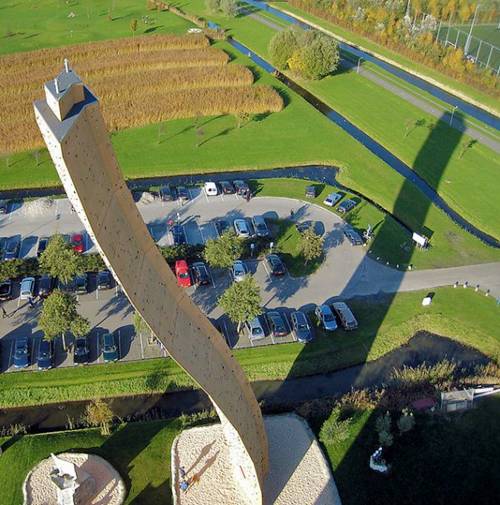
I get these picture from my Friend and sharing with
The world's highest climbing wall is situated in the town of Groningen, The Netherlands. It is 37 metres (121 ft) high and is known as the Excalibur. More images after the break...
Binding Xrefs On occasion, you will want to permanently attach an Xref to the host drawing. If you send your drawing files to a printing service to be plotted, including a set of Xref files can complicate things. Also, for archiving finished work, it’s better to reduce the number of files. There may also be occasions when the Xref has been revised for the last time and no longer needs to be a separate file. In all these situations, you will use the Bind command to convert an external reference into a block that will be stored permanently in the host drawing. Open the Xref Manager dialog box and highlight the Cabin12a Xref. Click the Bind button to open the Bind Xrefs dialog box. The two options in the Bind Type area have to do with how layers are treated when an Xref is bound to the host drawing. The default is Bind. It sets the Xref layers to be maintained as unique layers in the host drawing. With the Insert option, layers that have the same name in the two drawin...
10 reasons why PCs crash U must Know Fatal error: the system has become unstable or is busy," it says. "Enter to return to Windows or press Control-Alt-Delete to restart your computer. If you do this you will lose any unsaved information in all open applications." the E-Articles have many solutions and many articles about computer software. You have just been struck by the Blue Screen of Death. Anyone who uses Mcft Windows will be familiar with this. What can you do? More importantly, how can you prevent it happening? 1 Hardware conflict The number one reason why Windows crashes is hardware conflict. Each hardware device communicates to other devices through an interrupt request channel (IRQ). These are supposed to be unique for each device. For example, a printer usually connects internally on IRQ 7. The keyboard usually uses IRQ 1 and the floppy disk drive IRQ 6. Each device will try to hog a single IRQ for itself. If there are a lot of devices, or if they are not inst...
MDF,CABINETS AND DP MAIN DISTRIBUTION FRAME (M.D.F). Frame in the exchange used for making cross connections between the incoming cables and exchange equipment. On the line side of the frame the cables terminate on protector strips. It is a connecting/testing point where incoming cable (from switch room) out-going cable to cabinet are terminated. It is of two types (i) Wall Type. (ii) Floor Type. Both sides cables are terminated systematically and join them with a wire i.e. called jumper wire. By this we can change or shift a number easily. DEFINITION OF CABINET: It is a small testing point where primary and secondary pairs are terminated. CABINET CAPACITY: Total number of primary and secondary pairs those terminated in a cabinet is called capacity of cabinet. CONSTRUCTION OF CABINET: It is an almirah made of iron and fiber. It is fixed on the stand made of bricks and cement. TYPES OF CABINETS: 1 50/100 poles mount cabinet 2 300/400 ...